From : IRRIION TECHNOLOGIES
Date: December 2, 2025
Valid Until: Jan 2, 2025
QUOTATION NO: IRRIION/2025/TC2105
To : Flair Writing Industries Ltd
🚀Tally-Integrated DMS System
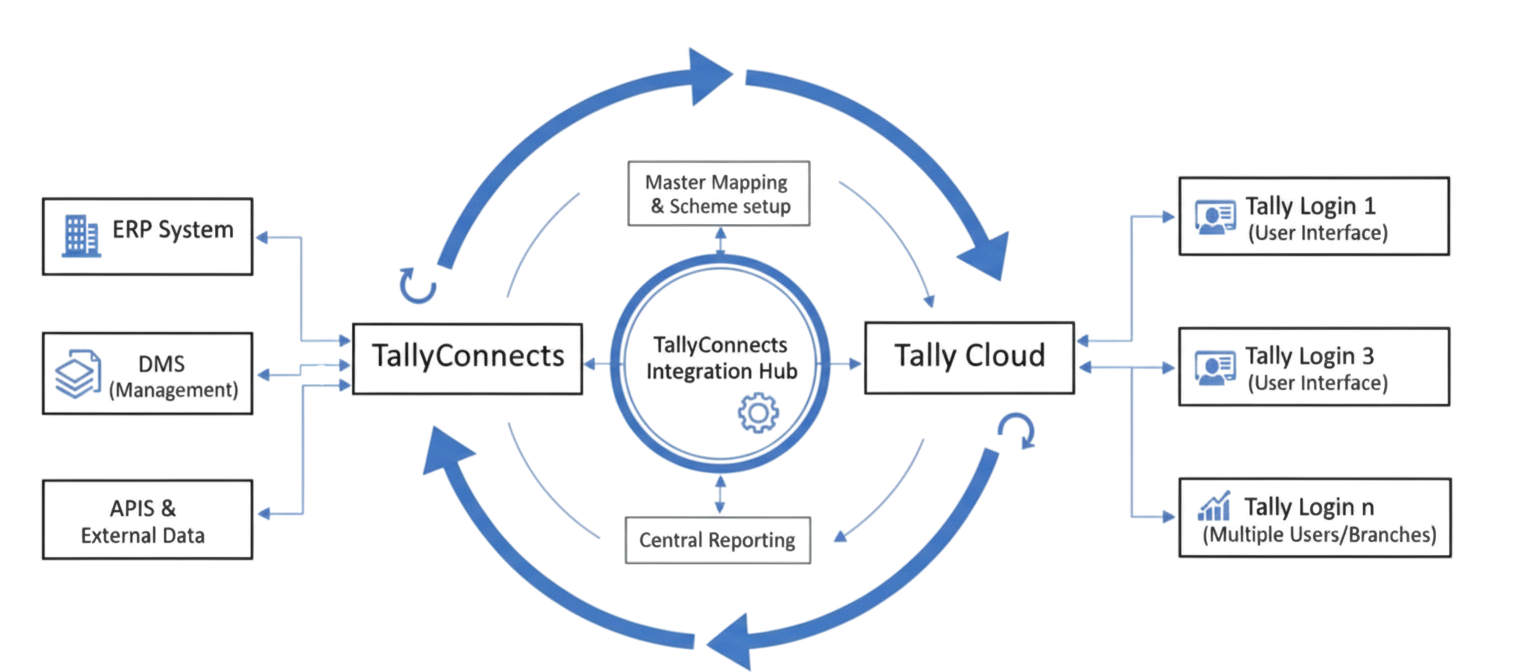
| 🚫 Problems | ✅ Solutions |
|---|---|
| DMS System Not Accepted by Superstockist |
Online Tally Access via TallyCloud Server
Provide controlled online Tally access through TallyCloud server, ensuring complete control over the system and data management while users work in their familiar Tally environment. |
| Difficult Data Control with Tally Connector |
Restricted Master Data Access
Implement restricted access controls in Tally with protected master data to eliminate duplication and ensure data consistency across the system. |
| Multi-Brand Billing Complexity |
Separate Tally Companies Per Brand
Prepare separate Tally company files for each brand/flair to maintain complete clarity and prevent any data mixing or confusion across different product lines. |
| No 2Way Sync with Tally & DMS |
Auto Create & Sync Data (Tally ↔ ERP)
Automatically create and synchronize data between Tally and ERP system in both directions for seamless integration and real-time data consistency. |
Work Process Overview: How the System Operates
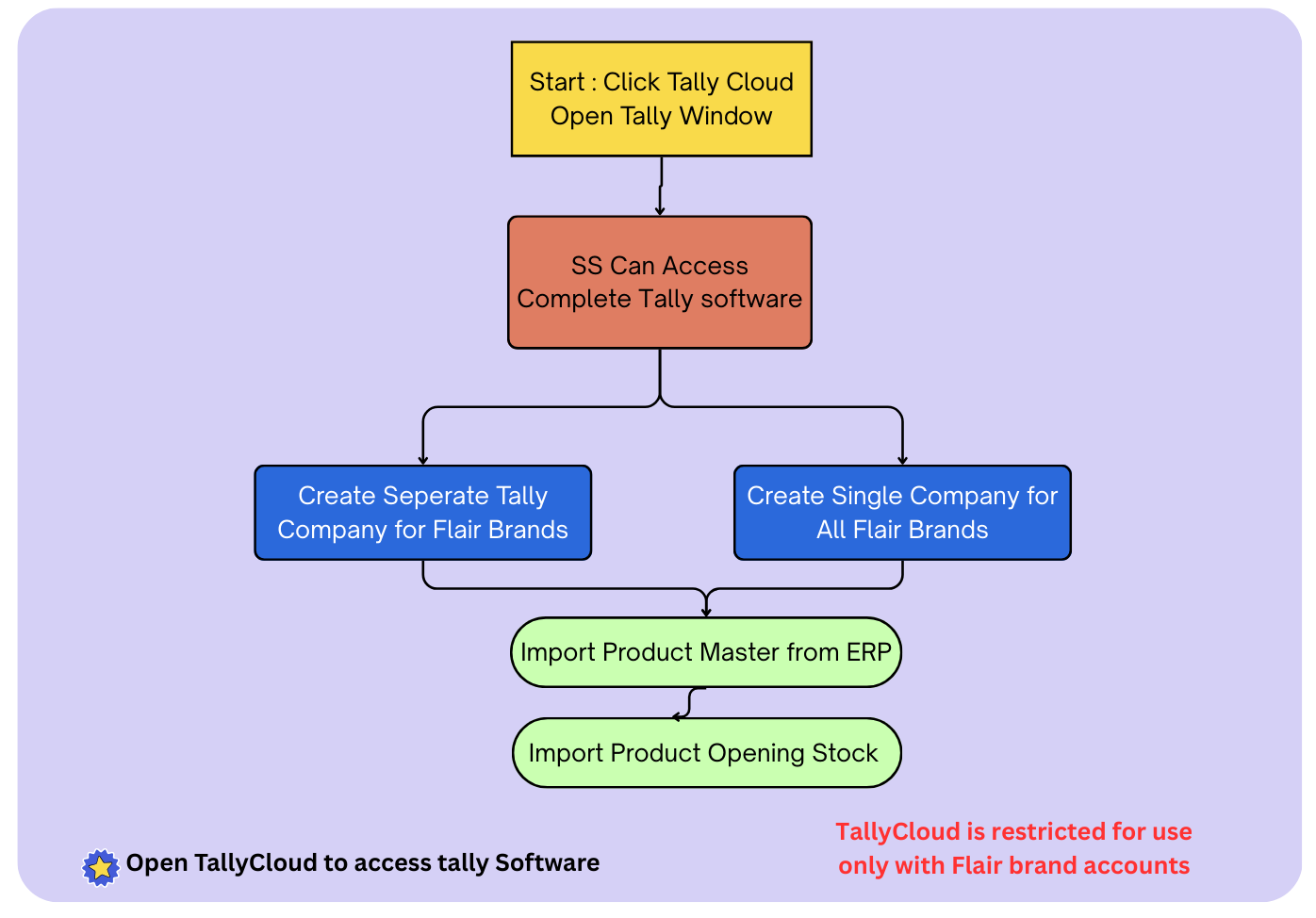
Step 1: Tally Software Access
- 📄 Each Super Stockist gets separate Tally software access with full Tally functionalities.
- 🏢 During Go-Live, separate Tally companies are created for each FlairPen brand to maintain clean data.
- ✅ Companies are pre-filled with Item Master data, auto-fetched from ERP via TallyConnector.
- 📥 Super Stockist can import opening balances from old Tally to Cloud Tally using an Excel template.
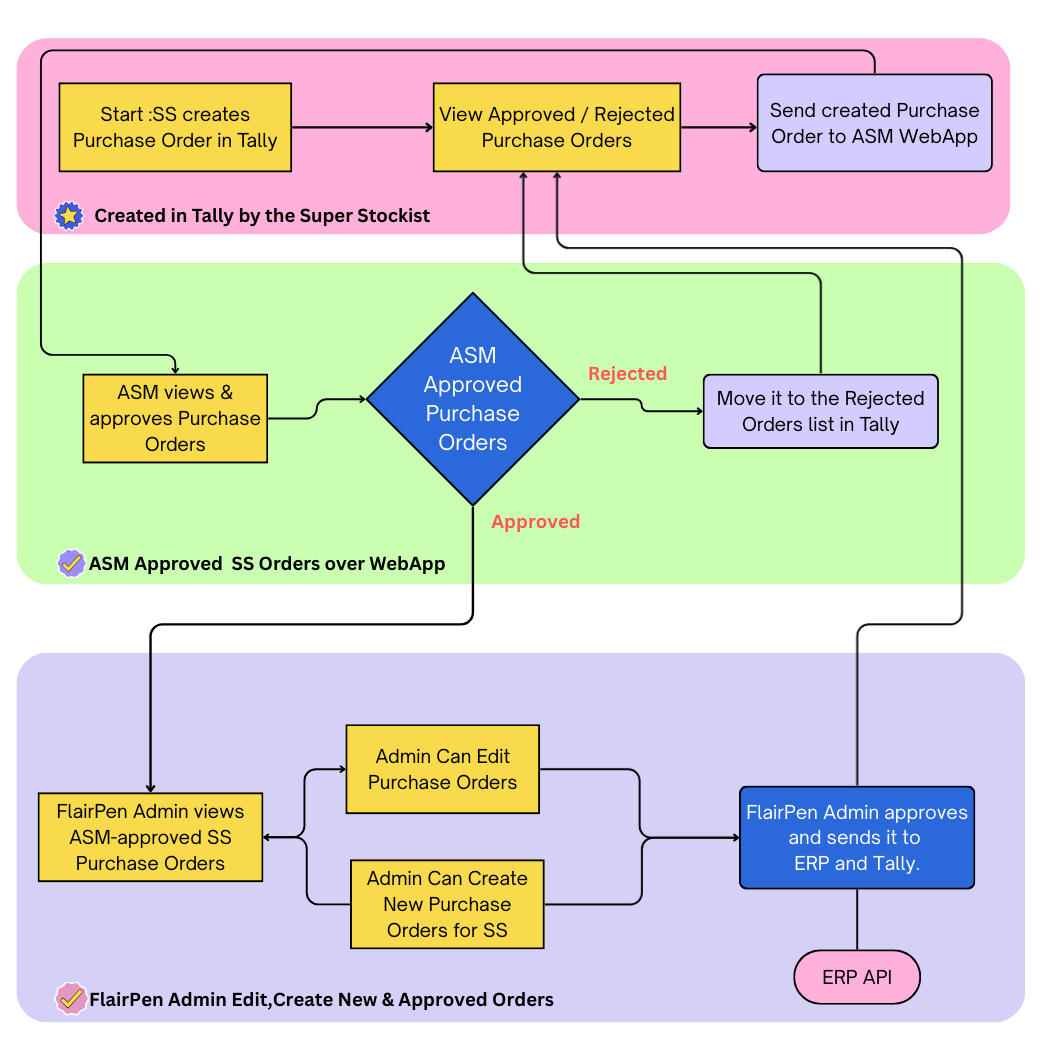
Step 2: GRN Creation Flow
- 📦 Super Stockist creates Purchase Order in Tally, which is automatically fetched by TallyConnector.
- 📝 The ASM reviews Purchase Order and approves or rejects it.
- 💻 FlairPen Admin can view all ASM-approved Purchase Orders and give final approval.
- ✏️ FlairPen Admin can edit Purchase Order and send it to Tally as well as to ERP as a Sales Order for FlairPen.
- 📝 FlairPen Admin can also create Purchase Orders for Super Stockists to force achieve their targets.
- 📤 The approved Sales Invoice is fetched from ERP into Tally as a Purchase Invoice.
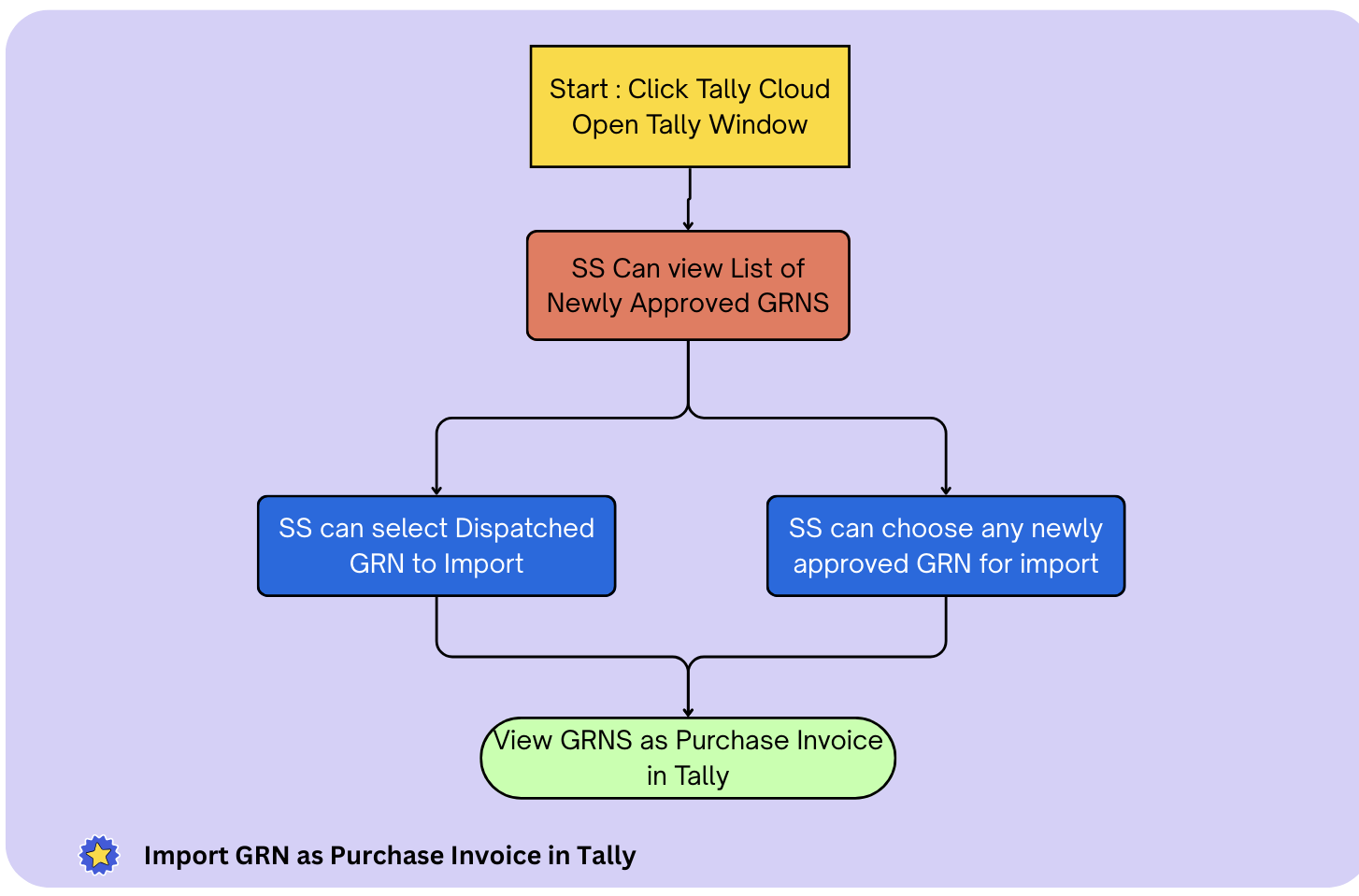
Step 3: Import GRN to Tally
- 📗 TallyConnector fetches GRNs from ERP using APIs.
- ✓️ Super Stockist can view GRN list and select the dispatched/Any GRNs he want in Tally.
- 🧾 The selected GRNs are auto-created in Tally as Purchase Invoices.
- 📈 Once the Purchase Invoice is created, inventory is auto-updated in Tally.
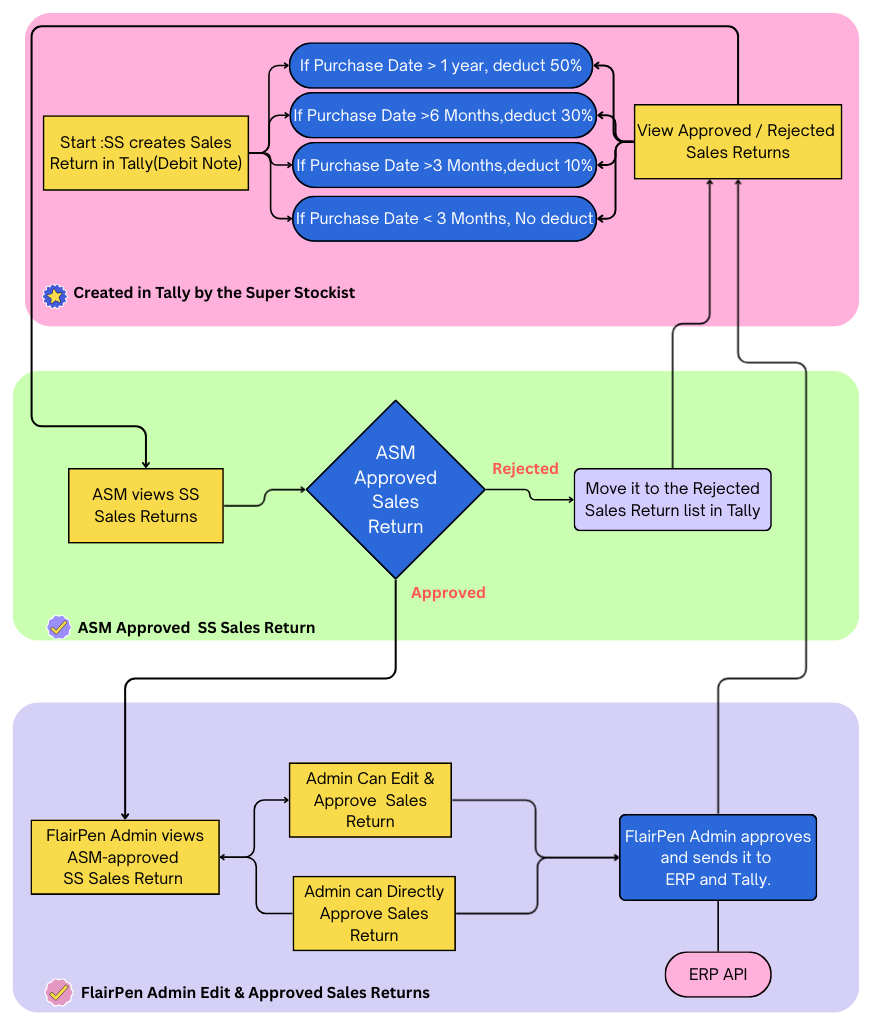
Step 4: Sales Return from Tally to ERP
- 🧾 SS creates Sales Return as a Debit Note in Tally.
- ⚙️ TallyConnector auto-creates it by validating the Purchase Invoice date and applying deductions.
- 📝 Sales Return becomes visible to ASM for review.
- 💻 Admin can view, edit, and approve it (changes sync back to Tally).
- 📡 After approval, it is pushed to ERP.
Step 5: Create Sales Invoice in Tally
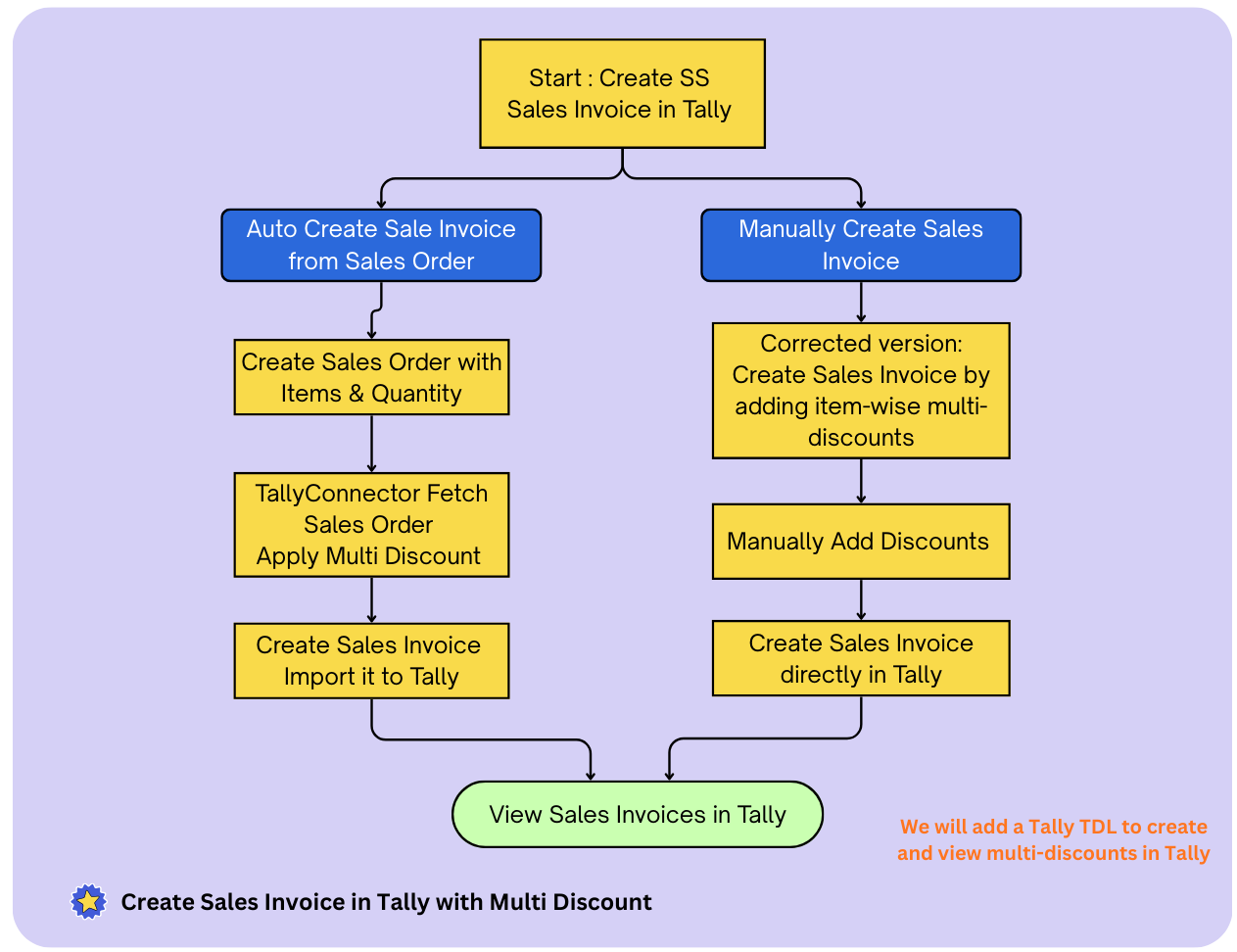
- 🧾 Super Stockist can manually create Sales Invoices using the Multi-Discount feature.
- ⚙️ Pre-configured TDL enables multiple discount columns for accurate invoice creation.
- 📥 Or SS Create Sales Order in Tally & TallyConnector will auto-convert it into a Sales Invoice.
- 💯 Auto-generated invoices include all correct Multi-discount calculations as per Schemes.
Step 6: Tally Report & Centralise Tally Reports
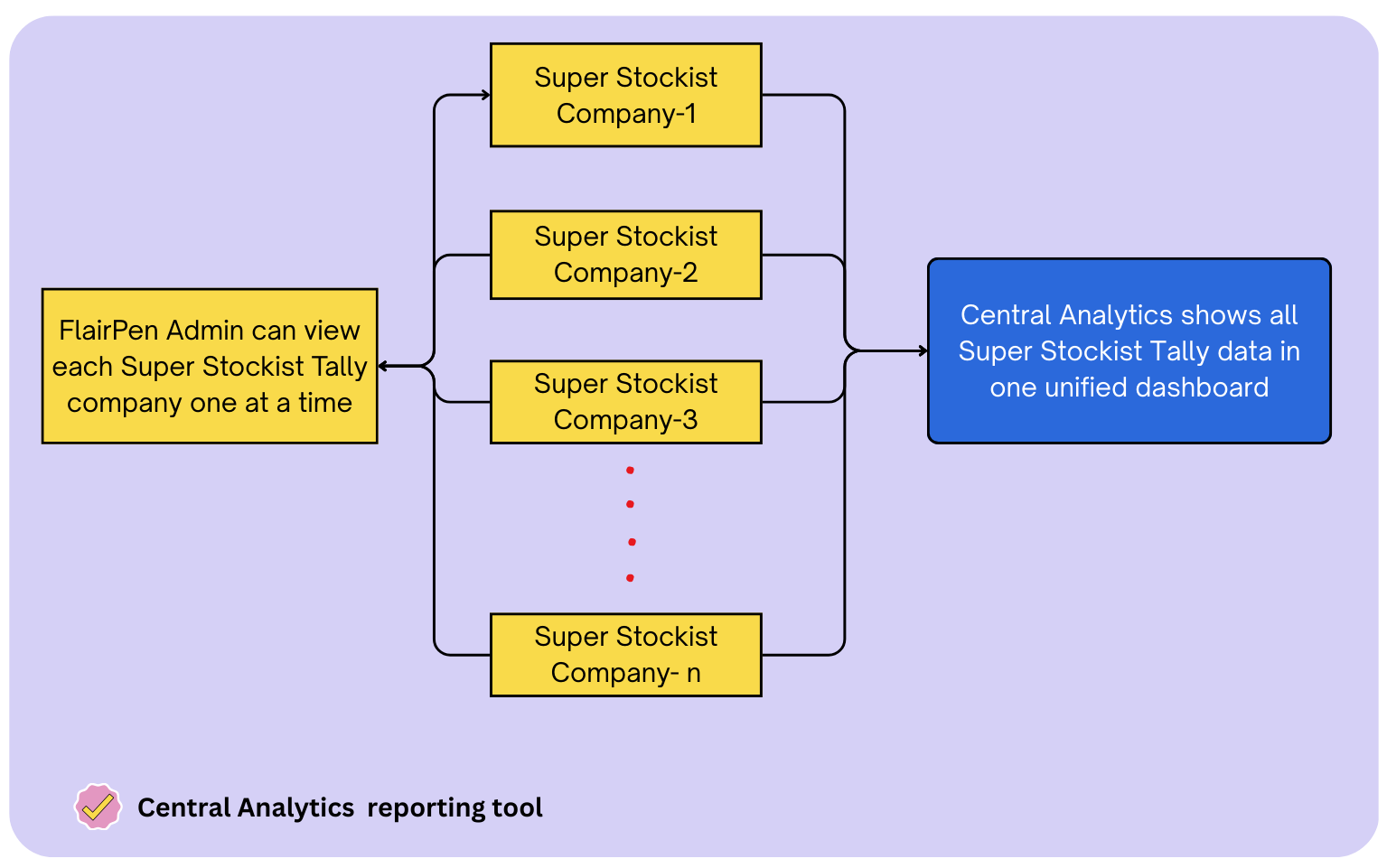
- 📊 FlairPen Admin can access all Super Stockist Tally companies and view their Tally reports.
- 📊 Central Analytics allows you to view all Super Stockist Tally data in one unified dashboard.
- 🧾 It provides consolidated and comparative reports across different Tally companies.
- ⚙️ Custom reports can be created as per your specific requirements.
Scheme Management Module
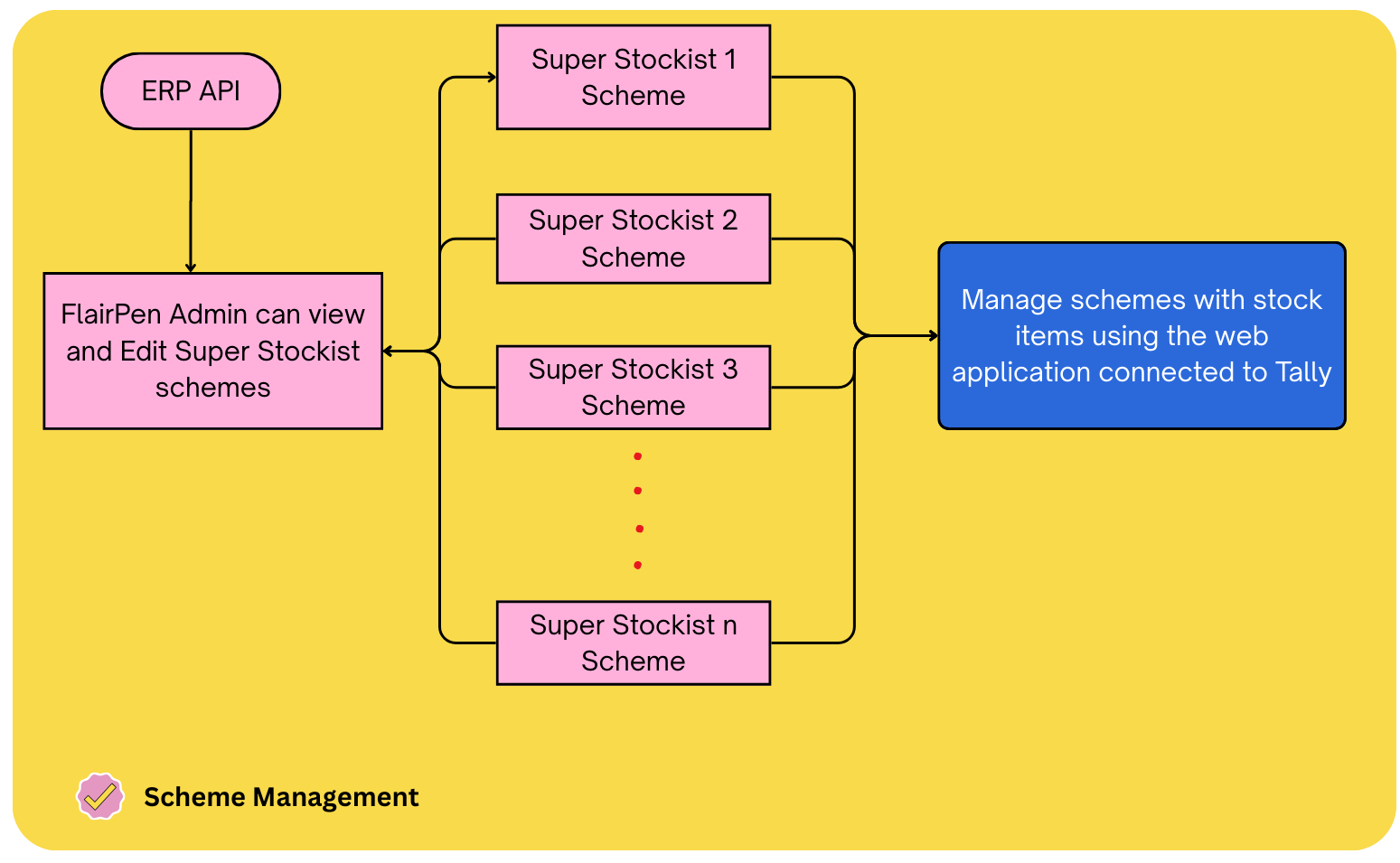
- Fetch Schemes from ERP into the Web Application.
- Assign Schemes to Super Stockists.
- FlairPen Admin can edit and manage Schemes.
- Admin can view Super Stockist wise applicable Schemes along with their Tally Stock-in-Hand.
- FlairPen Admin can swap discounted products after verifying Stock-in-Hand.
- Changes in Schemes will auto reflect within respective tally company
🚀 TallyConnects – Key Deliverables
1- TallyCloud Setup
- 📊 Complete TallyCloud server setup over secure access Azure hosting, SuperStockist-wise login as well admin logins, and environment configuration for all integrations.
2- Tally Integration
- 🔄 Master data syncs from ERP to Tally, including stock upload through Excel.
- 🏷️ Supports multi-discount structures such as Primary, Secondary, and Item-level discounts.
- 🧾Tally to ERP Integration to Create GRN, Sale retrun, Sale invoice Tally to ERP
3- Web Application & Central Reporting
- 🌐 Web application login for ASM and FlairPen Admin to approve GRNs and Sales Returns.
- 🧾 Web application with scheme manage madule to handle SS wise Schemes
- 📋 Web application to monitor Tally sync logs and active users.
- 📊 Central Analytics provides a unified dashboard to view all Super Stockist Tally data.
Tally Integration with TallyCloud – Cost Breakdown
TallyCloud Setup
Complete cloud hosting infrastructure on Microsoft Azure with 99.9% uptime guarantee
| Description | Amount (INR) | Type |
|---|---|---|
| Azure Server Hosting Cost (1 Year) This configured server can handle 150 to 250 users |
₹6,95,000 | Annual |
| Azure TallyCloud Installation & Setup | ₹1,85,000 | One-Time |
| Tally License We need 1 Tally Gold license per 50 users; currently, we will require 3 licenses |
₹2,38,000 | One-Time |
TallyConnects API Integration + Connector Setup
Seamless integration of your existing ERP system with TallyConnect platform
| Description | Amount (INR) | Type |
|---|---|---|
Tally Integration
|
₹6,30,000 | One-Time |
| TallyConnector Installation training & basic Support Tally Central Analytics - Data Sync Per Setup 7000/-(3000/-Precise+ 4000/-TallyConnector) consider 150 users Annual renewal: ₹3,500/- Superstockist + server charges If Needed |
7000/- Per Superstockist 50-user slot-wise billing |
Annual |
✨ What You Get
- Fully configured Azure TallyCloud infrastructure with a 99.9% uptime SLA.
- Seamless Tally-to-ERP integration powered by TallyConnect.
- A real-time analytics dashboard for complete business insights.
- Comprehensive documentation, training guides, and onboarding materials.
- 120 days of free technical support, followed by resource-based support.
- Regular system enhancements, updates, and security patches.
⏱️ Implementation Timeline
| Phase | Duration | Deliverables |
|---|---|---|
| Project Kickoff | 5 Working Days | Project planning & requirement analysis |
| Cloud Setup & Configuration | 1 Week | Azure infrastructure & TallyCloud setup |
| Integration Development Work | 10 Week | TallyConnector Tool,Tally TDL,Web Application |
| Connector Setup at each SS | 5-10 Weeks | Master migration and basic training |
| Total Implementation Period | 15-25 Weeks | |
📋 Terms & Conditions
- All prices are exclusive of applicable GST (18%)
- Development charges: 70% advance and 30% before final deployment.
- Server and setup charges are payable in full (100% advance).
- Annual renewal costs to be paid 30 days before expiry date
- This quotation is valid for 30 days from the date of issue
- Any changes in project scope may result in additional charges
- Client to provide necessary access and cooperation for timely implementation
- Support hours: 24/7 for critical issues, business hours for general queries
We look forward to partnering with FlairPen Company!
For any clarifications or modifications, please feel free to contact us.